Showing posts with label blogging. Show all posts

Monday, 3 June 2019

A new RPG blog, and lots of club admin

I have created a new blog, as I have a need to brain-dump some stuff about rôleplaying games that doesn't really belong on here. It's at The Sage DM, and will cover such topics as general thoughts on the art of DMing, converting D&D 2E to 5E, email/play by Google Docs, cartography, DnD Beyond (becoming the game aid I wish I'd written), and so on. I don't know how much I'll be posting (by no means as regularly as here), but I wanted to have a place to talk about these things that isn't this blog. I may flag articles in it if they crossover with aspects of the wargaming hobby.

And I'm not counting it towards the #hobbystreak after this post :D

Tonight is club night, and for once I don't have a game, having played all of yesterday :D We did have a committee meeting to discuss what to do while St. John's Ambulance are decorating our venue in July, which we think we've sorted, so I've offloaded the keys for locking up to another mug committee member, and am headed home for an early night.

Plan for the week:

  • I need to cobble together a couple of MDF buildings for OML.
  • Record a podcast (now I know what I'm talking about!)
  • More Dux Compendium
  • Order some Citadel Contrast paints
  • OML! Beer! Curry! Lard Assembled! Wargames!

Wednesday, 10 January 2018

Setting up a blog: Part 2 - headers, footers and sidebars

Ok, so, you have a post. But it's looking kind of lonely by itself, and everyone else's blog has cool sidebars and stuff...

Right. Go to your blog's management page (click on the B in a square, top left if you're not there already), and click Layout.

You should see a bunch of boxes that contain things labelled 'gadgets' in something that looks like the rough layout of things on your main blog page. (Tip for this: pick a theme like 'Simple' or 'Awesome Inc' for starters, as it makes working with this much more obvious. Don't pick "Notable"!)

Lets go through some of these. All you need to do to make changes is click the little Edit link in the bottom right corner of the gadget's box.

  • The Favicon gadget just sets the icon that appears in your browser toolbar when you visit the site. All you need is a small logo, 100px square, and you just upload it.
  • The Header->Navbar gadget controls the Blogger navber across the top of your page - you can turn it off, or change its colours to match your blog.
  • The Header->Page Header gadget allows you to set a banner image, fix the title and change the description of your blog. 
Ignore the boxes with 'Add a gadget' in for now - we'll cover useful other gadgets next time.
  • In the Main section, you have the Blog Posts gadget - this allows you to configure things like the date format, how many posts or how many days of posts to display, what data you want to display about the post, etc. Again, it's all pretty self-explanatory and like everything else here, the beauty of it is it's really hard to break things!
  • Featured Post allows you to tag a post as being exactly that, if the theme supports it. You can make it the most recent or if, say, you have a welcome/about post you want to be always visible, you can make it that instead.
  • Popular Posts gadget - does what it says on the tin - one thing to be aware of is that you can define the time range over which 'popular' is measured, depending on whether you want a bias towards recent material. I have a very odd post that has an insane amount of hits (well over 20,000 and twice as much as the next nearest...) for no reason I can see, and I've tweaked that setting so it gets ignored as being too old.
Now we come to the sidebar:
  • The About Me gadget takes your 'about me' entry from your Google profile as your author bio. You may want to consider if you actually want to do this, especially if you use your Google account for multiple things and thus have a non-subject-specific bio! If you don't, but still want a bio in the sidebar, I'll show you how in the next post.
  • Blog Archive shows a list of posts by month, or week, or day - very handy for letting your users navigate through your posting history once you have one.
  • Labels: as you probably noticed last time, you can label a post with keywords, This just allows viewers to click on a keyword and find the posts that use it. Both this and the Blog Archive you might want to remove until you have enough posts for it not to be embarrassing. 
  • Report Abuse: link so viewers can do exactly that. Not configurable beyond having it there or not.
  • Pages gadget - you can create static pages in your blog - such as the Linnius Campaign one here. They're a useful way of keeping more permanent content handy, and this gadget lets you display a list.
  • Search this Blog, and Follow By Email. Do what they say on the tin.
Last, the footer.
  • Attribution gadget. If you do nothing else, go read this article and then edit this gadget so your blog has a copyright/attribution notice, and consider creating a copyright page. And remember to change the year every Jan 1 (like I forgot last year)!
And there you go. Pretty sure some of this was obvious, but I hope there was some useful insight here. Next time, adding new gadgets.

Sunday, 7 January 2018

Starting a blog: Part 1 - getting set up

I had a question from a reader (and actually, not for the first time) the other day, on the general "how" of getting a blog like this set up. It's not hard, but it can seem a bit daunting at first, so, in the interests of having the answer somewhere that can be saved for posterity, I thought I'd do it as a blog post - in fact, inevitably, this is going to be a series!

First up, why Blogger? The simple answer is, because most of the blogging wargamers are using it, and it gives you the chance to join the community.

With that said... go to https://www.blogger.com/ and click on the 'Create Your Blog' button. It will prompt you to log in with a Google account - I'm assuming you have one, since most folks do: if not, you'll need to create one before you can use Blogger.

You'll then be prompted for a title for your blog and a domain name. The former can be whatever you choose, the latter will be <something>.blogspot.com.  As far as the <something> goes, it can be whatever you like as long as it's a) memorable, b) unique and c) only contains letters, numbers and dashes.
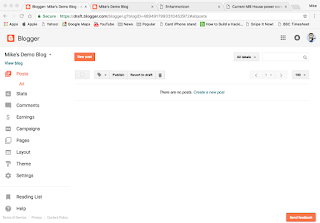
At this point you also get to pick a theme. This you can change later, so pick one that looks OK, and then click on 'Create Blog!'. Ignore the Google Domains prompt (they're after your money!) that follows.

There. You have a blog. That wasn't so hard!

You'll now be faced with the management screen - see right. The first thing you'll probably want to do is create a post, which is all in all pretty easy: hit New Post, give it a subject, start typing - c'mon, this is the easy bit, you wanted to create a blog so you must have something to say!

When you're done, hit Publish, and there you go. Your blog has content!

Next up, I'll cover adding fixed content such as sidebars etc, to your blog.

Wednesday, 22 April 2015

Salute blogger meetup - IMPORTANT CORRECTION

As Ray seems to have pre-empted me (go Ray): the meeting is in the MIDDLE of the hall (by the stage/painting competition) at 1pm

Oh, and here's today's Salute prep teaser. (Before you ask, it's a roll of lino.)


Tuesday, 25 March 2014

Lard Central

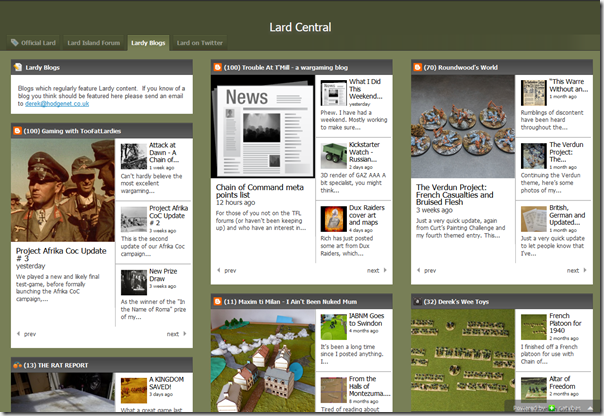
A quick plug for a nice piece of work by Derek of Derek's Wee Toys blog...


Basically, he's used the NetVibes framework to pull together a nice global feed of all things Lardie. Looks great, and I for one shall be keeping an eye on it.

The only question is... if I link to it from my blog, which is linked to it... will the universe implode on itself in a fit of web recursion? :D

Sunday, 20 October 2013

Tabletop Gaming Central

This looks interesting :D

The guys from Miniature Bids are starting up a wargaming blog network, called Tabletop Gaming Central. The best I can do, I think, is quote from their Facebook page:
Launching very soon, TGC is a new community based website for the tabletop hobby scene that looks to help promote hobby blogs by also acting like a blog network.
However, TGC goes one step further and gives the member blogs FRONT PAGE exposure for their posts by taking a 100 word excerpt of the member blogs recent posts and creating front page content from it. This content then links back to the original blog post help to increase exposure and readership for the member blogs.
On top of that, we will be looking for people to help generate site based content for TGC including full blog posts and news articles.
We're not stopping there though! We have forums too for you all to get involved in discussions about your favourite games and also user created groups, so you can create your own mini communities wthin the main community!
 As I said, looks interesting.

Apologies for the slightly hasty post - Andy and I are off to Firefest in about an hour to catch a day of classic/AoR rock, and I'm expecting to be in no fit state to blog later, even if I do get home before midnight!

Friday, 6 September 2013

Blog-con - 9-10 Nov 2013

An invite to the Bloggers Wargames Group Google+ community popped up in my inbox last night - thanks James!

Even more interesting, they're planning a con - Blog-con (ok, it's not the world's most imaginative name, but it does what it says on the tin) - at the new Wargames Foundry arena in Nottingham on the 9th/10th November. I think the motto's meant to read 'I Came, I Saw, I Wrote About It".

Since I seem to have very foolishly missed out on Scriv's El Cid campaign day on the 10th (silly me), I just might have to go along.

(On which topic? Not too late to book a place at our club's 'Normans In Italy' WAB Campaign day, 'Carve Out A Kingdom' on the 24th of November!)
Related Posts Plugin for WordPress, Blogger...